
Desktop Recommended
This simulator is not optimized for mobile devices. For the best experience — including interactive wire diagrams and the Voltmaster 2000 multimeter — please visit this page on a desktop or laptop computer.
Learn to Read Wire Diagrams & Diagnose Appliances Like a Pro
The Interactive Appliance Simulator puts you inside real-world service call scenarios — built from actual field experience — so you can master voltage logic, wire diagrams, and circuit thinking in a completely risk-free environment.
Try the Simulator
Select a dispatch scenario from the dropdown to begin troubleshooting.
A Quick Note on AI vs. Human Training: While this simulator leverages an AI engine to provide instant, pedagogical feedback on your submitted diagnosis, the Appliance Tech Academy training program itself is not AI. Our curriculum is built and taught by a real, experienced instructor. We strategically leverage AI on specific site features like this simulator to bring you enhanced, 24/7 interactive functionality.
Why This Simulator Is Different From Every Other Appliance Repair Training Tool
Most appliance repair training stops at theory — you read about how circuits work, you memorize components, and then you’re expected to figure it out on an actual service call. That gap between classroom knowledge and real-world diagnosis is exactly what this simulator was built to close.
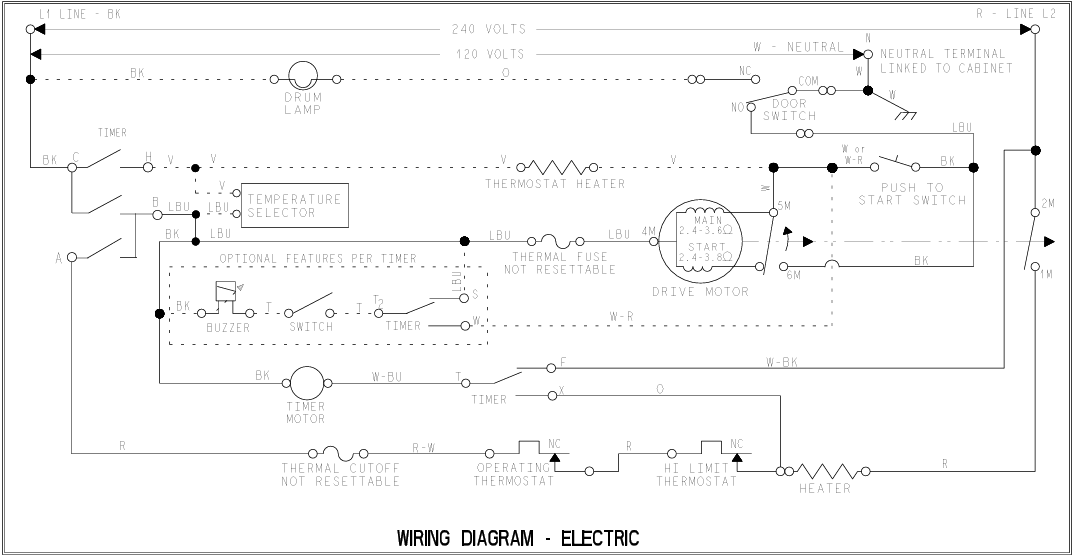
Every scenario in this simulator is rooted in a real dispatch our instructor took in the field. That means the faults you’re diagnosing aren’t invented for simplicity — they’re the actual, sometimes frustrating, real-world failures that technicians encounter every week. The wire diagrams you’ll read aren’t watered-down training versions. They’re the kind of schematics you pull from a service manual on a real job, because that’s the only way to train your brain to think in circuits.
The goal isn’t just to get you to the right answer. It’s to teach you how to think about voltage — to look at a diagram and understand what each circuit path is doing, where power should be present, where it shouldn’t, and how to use a multimeter to confirm your theory before you ever pull a part. That mindset is what separates techs who diagnose from techs who guess.
How the Simulator Works
Each module follows a structured dispatch format that mirrors how a real service call unfolds — from the initial complaint to a confirmed diagnosis.
Receive Your Dispatch
Each scenario opens with a dispatch — a customer complaint and appliance description, just like you’d receive on a real call. Your job starts before you ever open a diagram.
Study the Wire Diagram
Pull up the full schematic for the appliance. Probe test points to read simulated live voltages using the Voltmaster 2000 virtual multimeter — just like you would on the bench or in the field.
Apply Voltage Logic
Trace the circuit paths, interpret your readings, and apply real electrical theory to narrow down where the fault lives. Think in voltage, not just part names.
Submit Your Diagnosis
Type out what you believe the fault is and how you got there. Your answer is compared directly against the instructor’s documented diagnosis and reasoning.
Get AI-Powered Feedback
Our custom AI instructor reviews your logic — not just your answer — and gives you detailed, technical feedback on your reasoning so every attempt makes you sharper.
What’s Inside the Simulator
Built specifically for appliance technicians who want to go beyond memorization and actually understand how to read circuits.
Field-Based Dispatch Scenarios
Every scenario originates from an actual service call the instructor ran. You’re not practicing on textbook problems — you’re working through the real failures that real appliances have in the real world.
Interactive Wire Diagrams
Move beyond static PDFs. Probe test points directly on the schematic to read simulated live voltages, just as you would with a meter in hand on an actual service call.
Voltmaster 2000 Multimeter
Practice correct lead placement, read voltage drops across components, and learn to interpret your readings to isolate failed parts — without guessing or throwing parts at the problem.
Voltage & Circuit Logic Training
Every scenario is designed to reinforce how electricity actually moves through an appliance — teaching you to think in circuits, not just component lists, so the logic transfers to every machine you touch.
AI-Powered Instructor Feedback
Submit your diagnosis and our AI engine compares your reasoning to the instructor’s documented answer — giving you highly technical, pedagogical feedback whether you nailed it or missed something.
Always Growing
We’re actively expanding — more appliances, more fault scenarios, and enhanced multimeter functionality are on the roadmap. The simulator grows alongside the Certified Professional Track curriculum.
We’re Building This in the Open — And We Want Your Input
The simulator is currently in its initial Beta phase. We’re actively developing it — adding new appliances, expanding scenario libraries, and building out more advanced multimeter functionality. What you’re seeing now is the foundation, and it’s going to keep growing.
When development is complete, full access to the simulator will be exclusive to students enrolled in the Certified Professional Track. But right now, while we’re building and refining it, we’d love for you to try it and tell us what you think.
Is this the kind of tool that would have helped you early in your training? Is there an appliance or scenario type you’d love to see added? Use our Contact form to send us your feedback — we read every message and it directly shapes what we build next.
Get Full Access: Join the Certified Professional Track
The complete simulator library — including all advanced scenarios, additional appliances, and future modules — is an exclusive tool for students in our premium training track. If you’re serious about building a real diagnostic skillset and understanding appliance repair at the electrical level, this is where that happens.
Join the Certified Professional TrackFrequently Asked Questions
Everything you need to know about the simulator and what it’s designed to do.
Do I need prior electrical experience to use the simulator?
Some foundational knowledge helps, but the simulator is designed to teach you how to think through circuits as you use it. The dispatch format guides you through the process, and the AI feedback explains what you missed and why — making it a learning tool, not just an assessment.
Are the wire diagrams the same as what I’d see in the field?
Yes. The diagrams used in the simulator are based on real appliance schematics — not simplified versions created for training. The intent is to get you comfortable with exactly the kind of diagram you’d pull from a service manual on an actual job.
Where do the scenarios come from?
Every scenario is based on an actual service call the instructor completed in the field. The fault, the symptoms, the dispatch — all of it is drawn from real experience so that what you practice reflects what you’ll encounter.
Is the simulator free to use?
A preview of the simulator is currently open to the public during Beta. Once development is complete, full access will be available exclusively to students enrolled in the Certified Professional Track.
What appliances will be added in the future?
We’re actively expanding the library. More appliances and fault scenarios are in development, along with enhanced multimeter functionality. We take user feedback seriously — if there’s something you’d like to see, tell us using the Contact form.
How do I submit feedback on the simulator?
We’d genuinely love to hear what you think — what’s working, what’s missing, and what scenarios you’d find most valuable. Send your thoughts through our Contact Us page and it goes directly to the team building it.
Scenario Library
Browse available training simulators below. Locked scenarios require enrollment in the Certified Professional Track.